
Full-Stack Healthcare Operations System
Biomedical Equipment Records Management System (BERMS)
- Project type
- Full-Stack Healthcare Operations System
- Architecture
- Frontend (JavaScript SPA) → Express REST API → MySQL Database
Stack
- Node.js
- Express.js
- MySQL
- REST API
- HTML
- CSS
- JavaScript
Key technical concepts
- Relational Database Design
- Business Rules
- Data Validation
- Automated Testing
- CSV Reporting
From biomedical clerk work at The Medical City, Clark.
01
Executive Summary
At The Medical City I kept biomedical equipment files and prepared the monthly reports and transmittals from them. Another department could ask whether a device was available, whether preventive maintenance was due, and what service was already on file. Those facts were hard to keep together, and a device can be in service while its maintenance is overdue. BERMS keeps them on one record and calculates the maintenance status from the next due date, so a report and a retrieval follow the same rules. The working example uses sample devices, not an export from the hospital. It does not store patient information, and it was not the hospital's production system.
02
Business Problem
Device inventory, preventive maintenance, service requests, and maintenance history were hard to keep in one place. A monthly report, or a request from another department, still needed all of them.
A device can be in service while its maintenance is overdue, and it can also have an open service request. If those facts are stored as one status, the report and the retrieval both give the wrong answer.
Who would use it. Biomedical services, and any department asking whether a device is available, due for maintenance, or already documented.
Decisions it supports
Available or not
In service counts as available. In repair and out of service do not. A decommissioned device stays in the inventory and leaves the maintenance counts.
Due or overdue
Preventive maintenance status is calculated from the next due date. Due means today or the next 30 days. Overdue means that date has passed.
Already documented
Maintenance history and open service requests stay on the device, so a follow-up does not start from a blank file.
Safe to report
The counts above the table stay on the full inventory. A department filter is not the fleet total.
03
Context
The process comes from biomedical clerk work at The Medical City in Clark, from March to June 2023. Health informatics coursework is the layer that treats that file as something a report can be built from. The rows in the working example are a fresh setup, not an export from the hospital.
The file
Equipment documents, correspondence, and the maintenance paperwork the department ran on.
The monthly report
Reports and transmittals were prepared from those files and checked against the source before they went out.
The retrieval
Another department could ask for a device status or a document. The record had to answer without reconstructing the file.
What BERMS holds
Inventory, a calculated preventive maintenance status, maintenance history, service requests, and a CSV for the report. No patient information.
04
Dataset / Inputs
The clerk work used equipment inventories, preventive maintenance schedules, operational status, and service documentation. The record is built from those same facts: device name, asset tag, serial number, model, manufacturer, category, department, operational status, and maintenance schedule. Each service visit and each service request stays attached to the device. The rows below are sample records for a fresh setup, not an export from the hospital.
Device identity
Name, asset tag, serial number, model, manufacturer, category, and department. Creating a device records an asset registration, so later service stays on that device.
Operational status
In service, in repair, out of service, or decommissioned. This is separate from the preventive maintenance status.
Maintenance schedule
Monthly, quarterly, semi-annual, or annual. The next due date is what the status is calculated from.
Service visit
The visit, the operational status after the check, and the findings. Findings are required when the device is not returned to In Service.
Service request
Who reported it, the priority, the problem, and the status. Closing the request records the closed date.
Sample records
These examples reflect a fresh setup. A later preventive maintenance visit updates the next due date.
- PM-001
- Semi-annual schedule. Preventive maintenance is due. Includes an incoming inspection and preventive maintenance by M. Santos.
- IP-014
- Quarterly schedule. Preventive maintenance is overdue. Assigned to the Emergency Department, with supplier follow-up by P. Garcia and open request SR-1001.
- VN-208
- Semi-annual schedule. Preventive maintenance is current. Completed request SR-1003.
- DF-033
- Annual schedule. In repair. Preventive maintenance is not scheduled. Request SR-1002 is waiting for parts.
- IMG-017
- Annual schedule. Out of service. Preventive maintenance is overdue.
05
Approach
Each device has one record. Operational status and preventive maintenance status stay separate. Preventive maintenance status is calculated from the next due date every time the record is opened. It is not stored as a value someone types in.
- 01
Not scheduled
The record has no next preventive maintenance date.
- 02
Overdue
The next preventive maintenance date is before today.
- 03
Due
The next date is today, or it falls within the next 30 days.
- 04
On schedule
The next date is more than 30 days from today.
The last preventive maintenance date changes only after preventive maintenance, an incoming inspection, an electrical safety test, or a calibration. A corrective visit can change the operational status. It does not change either preventive maintenance date. Decommissioned devices remain in the inventory totals and are excluded from the preventive maintenance counts. A service request does not reset those dates.
06
Key Insights
The useful part is what a reviewer can see before a count is used in a report. These are consequences of the record rules and the sample rows, not findings from the hospital's live inventory.
In service and overdue can both be true
IMG-017 is out of service and overdue. A different device can stay in service while maintenance is overdue. A single status would hide one of those facts.
The follow-up row is specific
IP-014 is on a quarterly schedule, assigned to the Emergency Department, and overdue, with supplier follow-up already noted and request SR-1001 still open.
A filter must not change the total
The counts above the table stay on the full inventory. A department filter cannot be read as the whole biomedical inventory.
A repair does not reset maintenance
Corrective work can change whether the device is in service. Only a qualifying visit moves the preventive maintenance date. A service request does not move it either.
Waiting for parts is its own fact
DF-033 is in repair, preventive maintenance is not scheduled, and SR-1002 is waiting for parts. Availability, maintenance, and the open request answer different questions.
What these rules would flag on a live inventory
This is the class of finding, not a result from The Medical City. The sample rows only show that the rules can separate these cases.
- A device still in service whose preventive maintenance is overdue.
- An overdue device that also has an open service request.
- A department filter whose row count is smaller than the inventory total.
- A corrective visit that changed operational status and left the maintenance date where it was.
07
Business Value
The same records support the report, the retrieval, the service workflow, and the next maintenance cycle. This is the work that often stays in spreadsheets and paper files.
- One inventory
- Device identity, department, and operational status sit on one record instead of a separate file for each question.
- Compliance
- Due, overdue, on schedule, and not scheduled are calculated from the next maintenance date, including a 30-day window for what is coming due.
- Availability
- In service, in repair, out of service, and decommissioned are visible without opening each file.
- Service workflow
- A request has a priority and a status, and it stays attached to the device through resolution.
- Reporting
- Inventory, maintenance schedule, service request, and operations summary files can be downloaded when the report is needed.
- Data quality
- History is kept. Findings are required when a device is not returned to service. A decommissioned device stays visible in the inventory.
08
Lessons Learned
One status is not enough
Availability and preventive maintenance answer different questions. Storing them as one value hides one of the facts.
A repair must not reset maintenance
Corrective work and a service request can change whether the device is usable. Only a qualifying visit moves the preventive maintenance date.
A filter must not change the total
If the count above a filtered table shrinks with the filter, a department list gets reported as the whole inventory.
A typed department name splits the report
Two spellings of the same department are stored as two departments, so the breakdown is only as clean as the name.
09
Key Features
Equipment inventory
- Asset registration, with category, department, and operational status.
- Search by device name, asset tag, serial number, model, manufacturer, or department.
- Filter by preventive maintenance status, operational status, category, schedule, and department.
Preventive maintenance
- Monthly, quarterly, semi-annual, or annual schedules.
- Due and overdue status calculated from the next due date.
- Maintenance history kept on the device, newest first.
Service requests
- A request is opened against a device, with a reporter and a problem description.
- Priority is Low, Medium, or High.
- Status moves through Open, In Progress, Waiting for Parts, Completed, or Cancelled.
Operations dashboard
- Fleet counts, equipment availability, and preventive maintenance compliance.
- Department and category breakdowns.
- Open work, request age, and devices that keep drawing service.
Reporting center
- Inventory, preventive maintenance schedule, service request, and operations summary reports.
- Each file is a CSV, generated when it is downloaded.
10
Solution
Four views share the same records: the inventory, the operations dashboard, service requests, and the report center.
- Search and filter the inventory. The counts above the table stay on the full set of devices.
- Open a device for identity, operational status, preventive maintenance status, and history.
- Record a service visit with the status after the check and the findings.
- Open a service request and move it through to completion or cancellation.
- Read availability, maintenance compliance, and support demand on the dashboard.
- Download an inventory, maintenance schedule, service request, or operations summary CSV.
- Take a device out of use by marking it Decommissioned. The record is not deleted.
Outside this scope
- Patients, clinical workflows, work orders, parts inventory, purchasing, and supplier contracts are out of scope.
- There is no sign-in. Anyone who can open the working example can add or edit a record.
- Department names are stored as entered, so two spellings of the same department are treated as two departments.
- Reports are CSV only. They are not saved, scheduled, or emailed.
11
Technical Highlights
I designed the records, the database, and the tests. The maintenance rules do not depend on the framework. The working example is a page that calls a JSON API. The server checks the input, applies those rules, and reads and writes the database with parameterized queries.
Core tables
equipment
Identity, category, department, operational status, and the preventive maintenance dates.
maintenance_history
Visits on that device. History is not deleted, and a device with history is not deleted.
service_requests
The reported problem, the priority, and the status through close. The request number is generated.
REST API
Express routes for the device list, one device, maintenance history, service requests, dashboard counts, and CSV downloads.
Relational design
History and service requests reference equipment. Both stay when the device is taken out of use.
Business rules
Preventive maintenance status is calculated. Only a qualifying visit moves the maintenance dates. Findings are required when a device is not returned to service.
Validation
Invalid input returns 400. A duplicate asset tag or serial number returns 409. A missing device or request returns 404.
Modular server
Routes, validation, maintenance rules, request rules, summary counts, and CSV formatting are separate modules.
Automated tests
Node assert tests cover preventive maintenance dates, history rules, summary counts, request numbers, filters, and report rows. They do not need MySQL.
Dashboard calculations
Available equipment is in service. Unavailable is in repair plus out of service. The on-schedule rate leaves out devices that are not scheduled and devices that are decommissioned.
CSV reporting
Inventory, preventive maintenance schedule, service requests, and an operations summary. Each file is built at download. Nothing is written to disk.
Working example: HTML, CSS, JavaScript, Node.js, Express.js, MySQL, Node.js assert tests.
12
Screenshots
Screens from the working example. Sample devices only. No patient information, and not the hospital's production system.
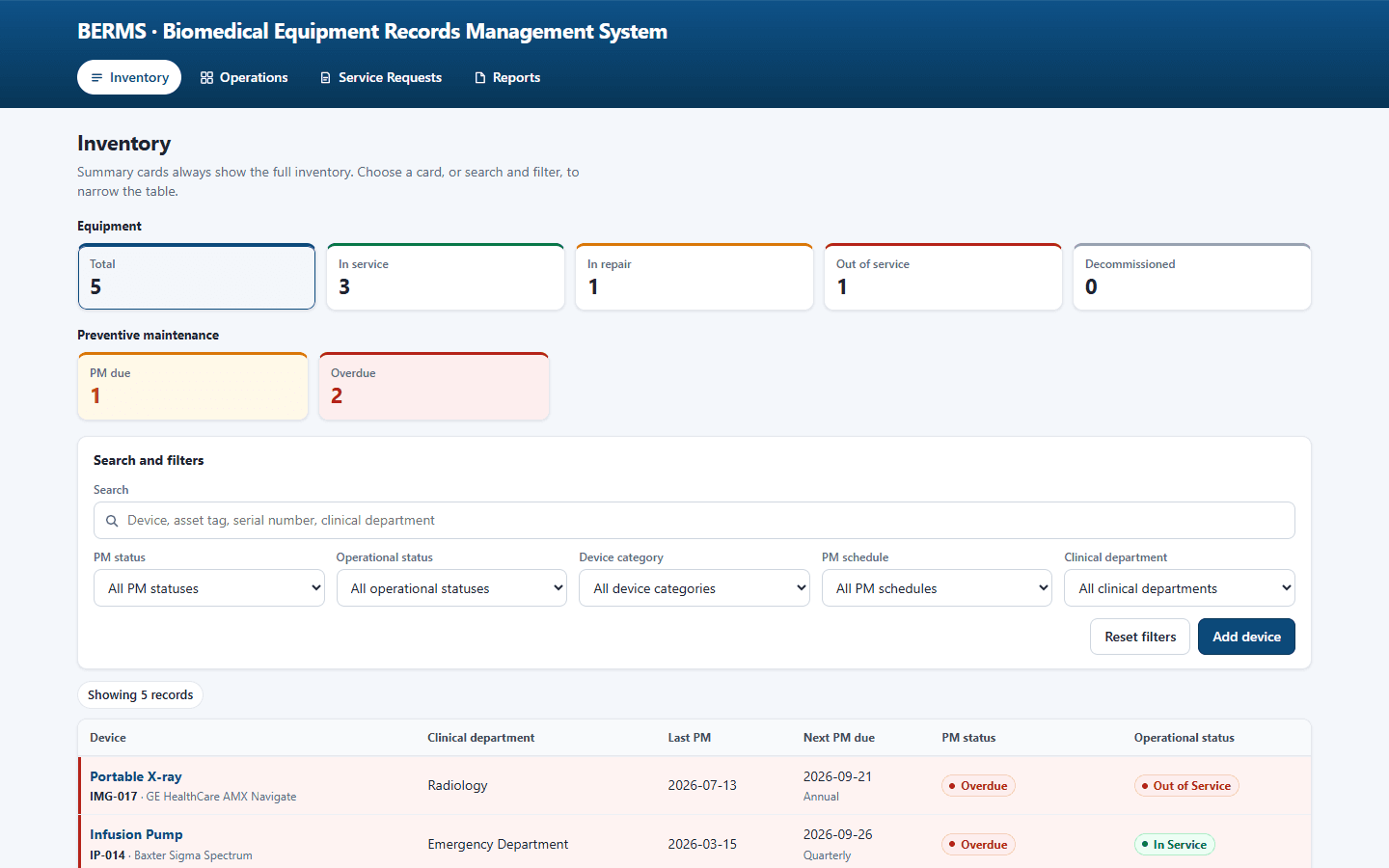
Inventory View
The device list with inventory counts. Summary cards stay on the full inventory while the table is filtered.
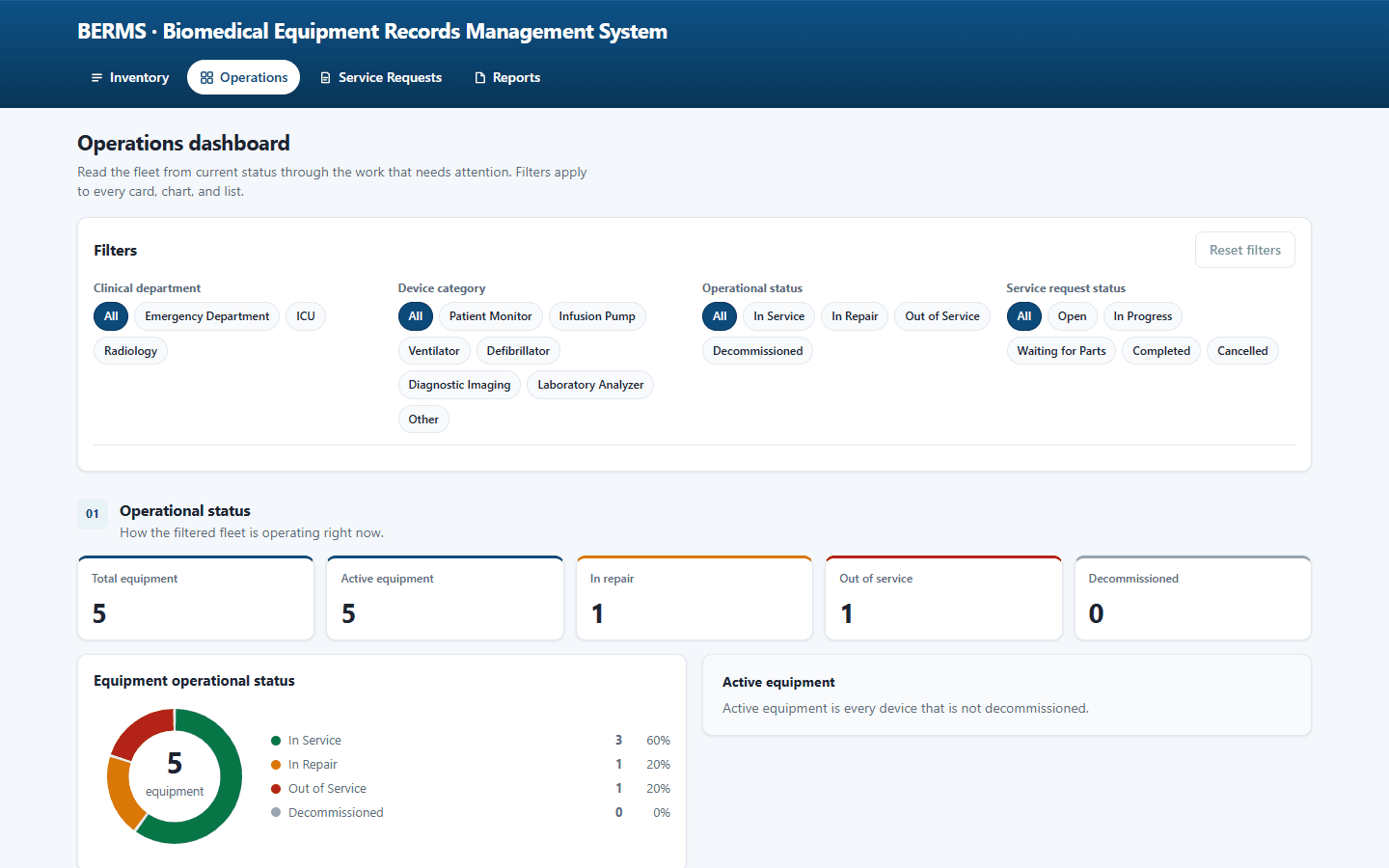
Operations Dashboard
Fleet counts, maintenance compliance, availability, open work, and breakdowns by department and category.
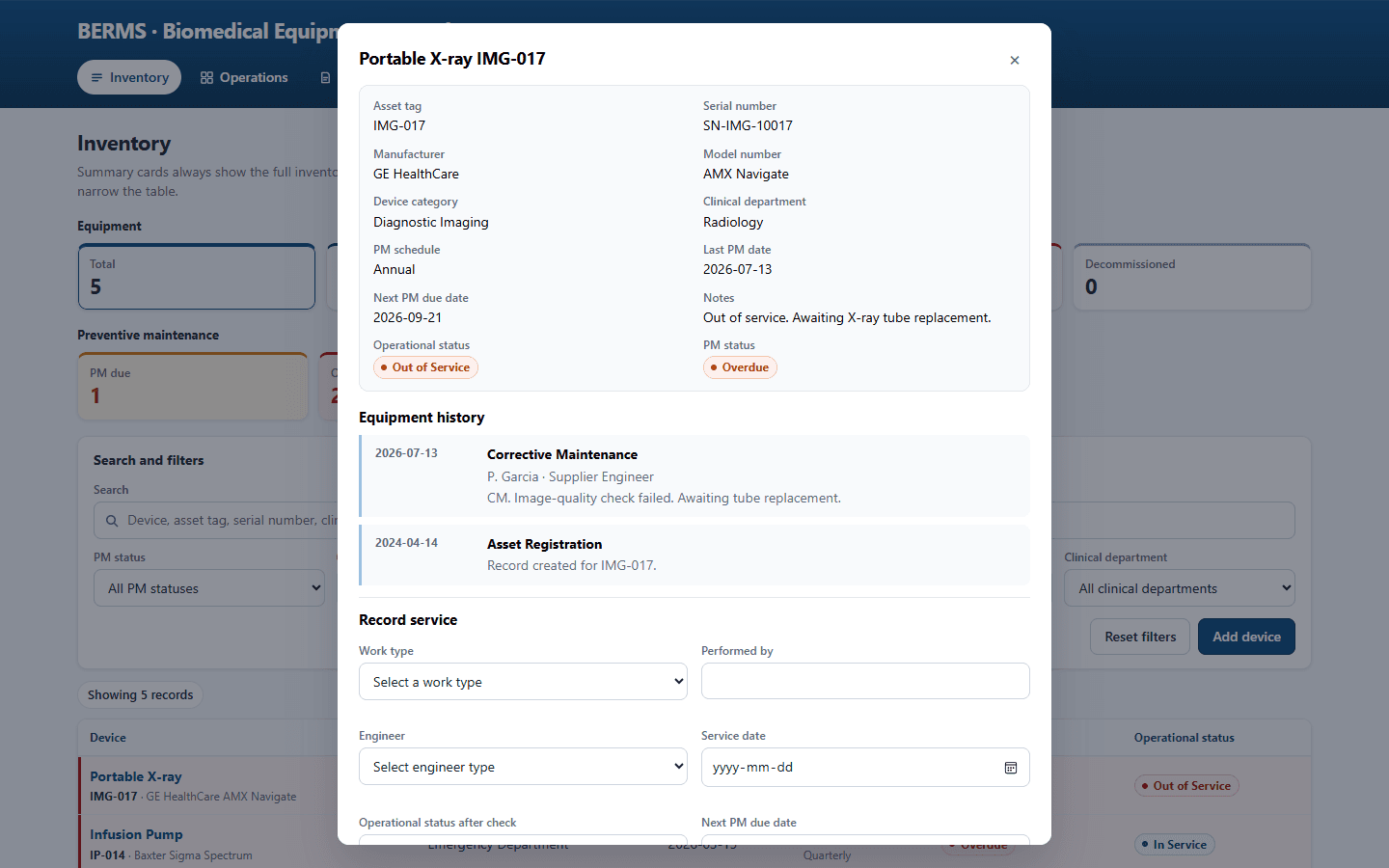
Device Record
One device: identity, department, operational status, and preventive maintenance status.
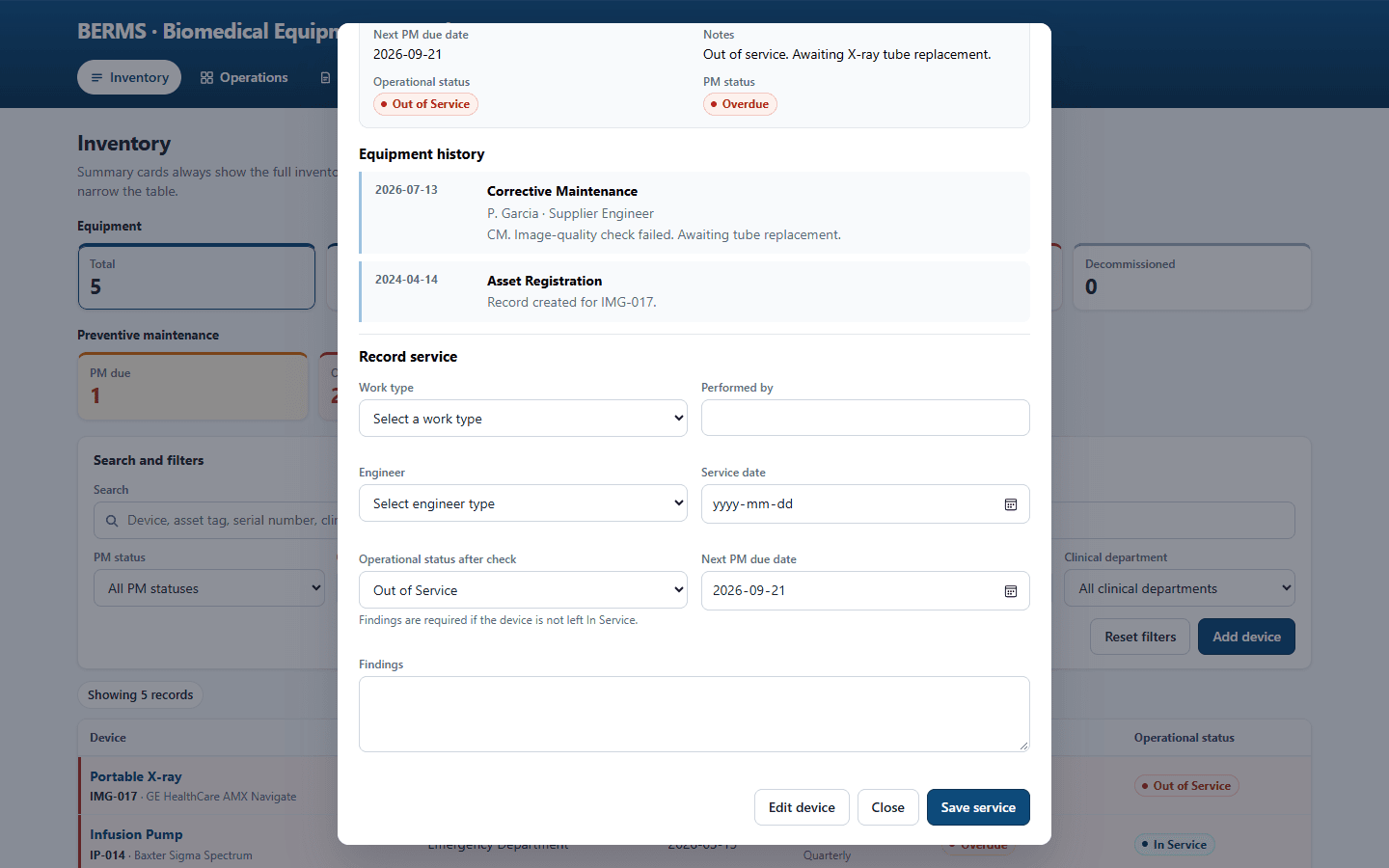
Maintenance History
Service visits on that device, newest first, and the form for recording the next visit.
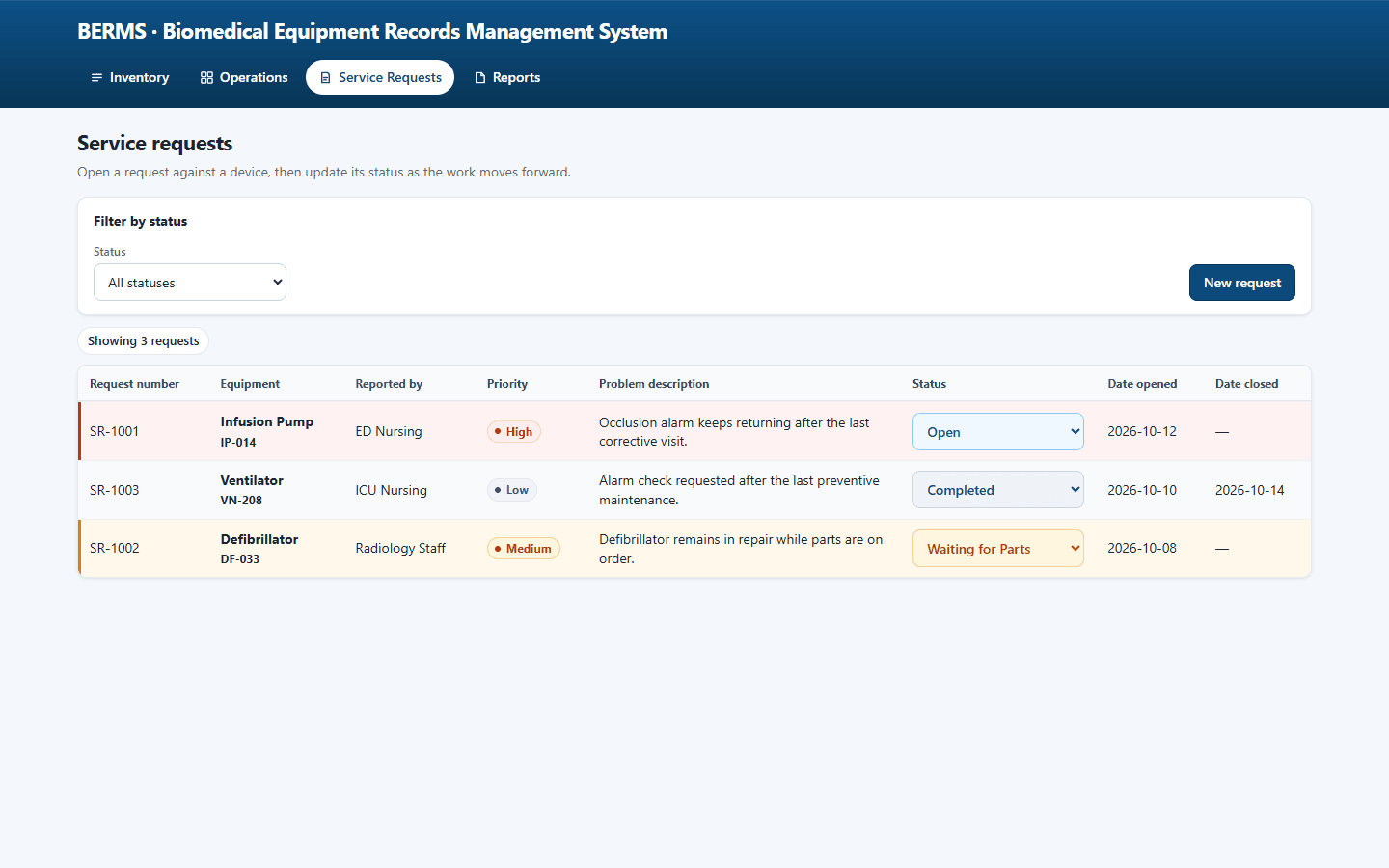
Service Requests
Request number, device, reporter, priority, problem, and status from open through close.
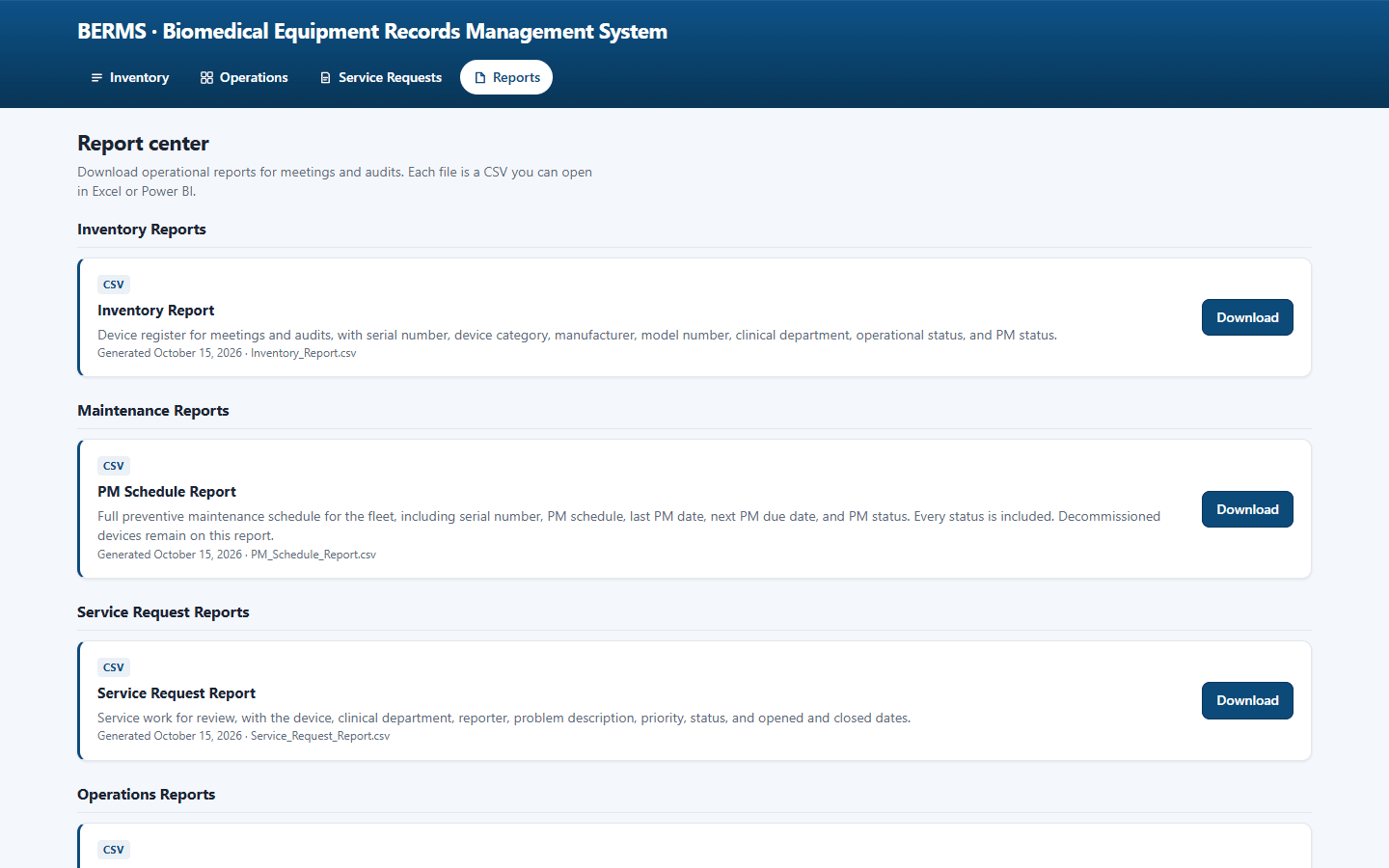
Reporting Center
Inventory, preventive maintenance schedule, service request, and operations summary downloads.
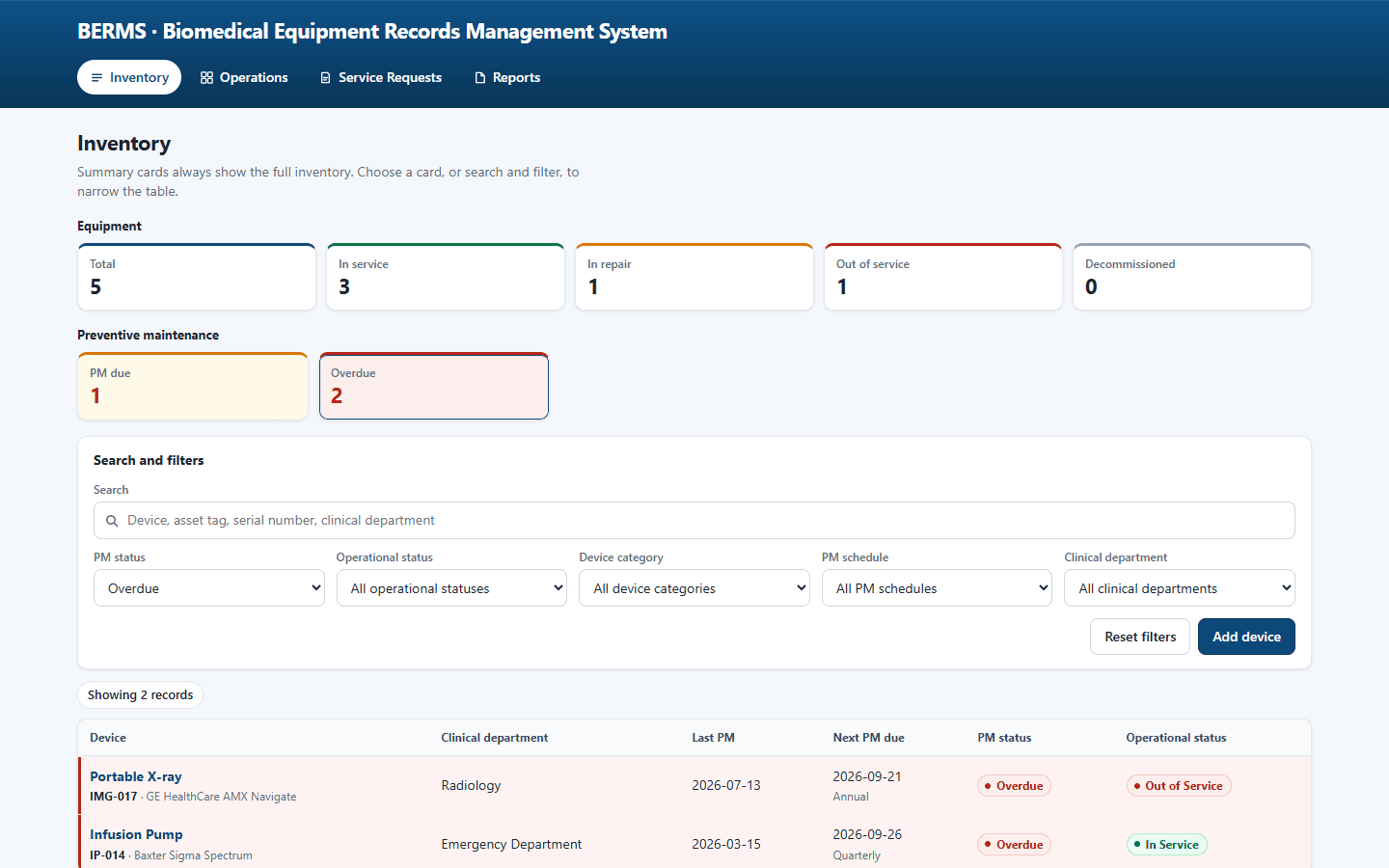
Search & Filtering
A preventive maintenance or department filter narrows the table. The inventory totals do not change.
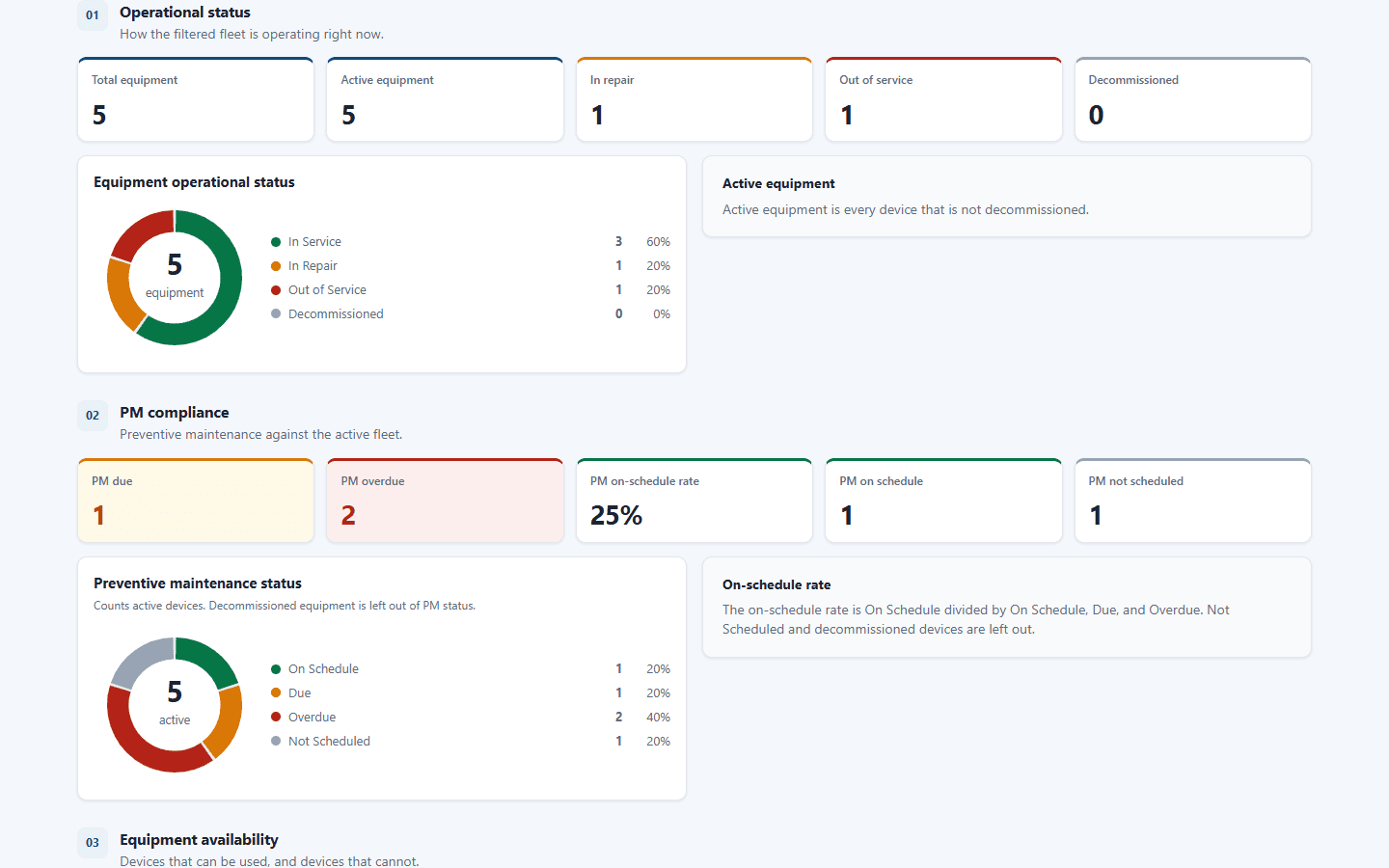
Device Status Monitoring
In service, in repair, out of service, and decommissioned, kept separate from preventive maintenance status.
13
Portfolio Impact
BERMS comes from biomedical clerk work at The Medical City. Equipment availability, preventive maintenance, and the service already on file stay on one record, so a monthly report and a department request follow the same rules.
14
Skills Demonstrated
- Healthcare operations
- Information management
- Reporting support
- Data validation
15
Where this work applies
The work is the equipment lifecycle at The Medical City: what is in service, what maintenance is due, and what service is already on file. A report and a department request use that same record.
- Data Analyst
- Operations Analyst
- Healthcare Analyst
- Business Analyst
- IT Analyst
- Application Support
- Systems Analyst
- Junior Software Developer
- Backend Developer
Next project. Hotel group pricing